 EN
EN

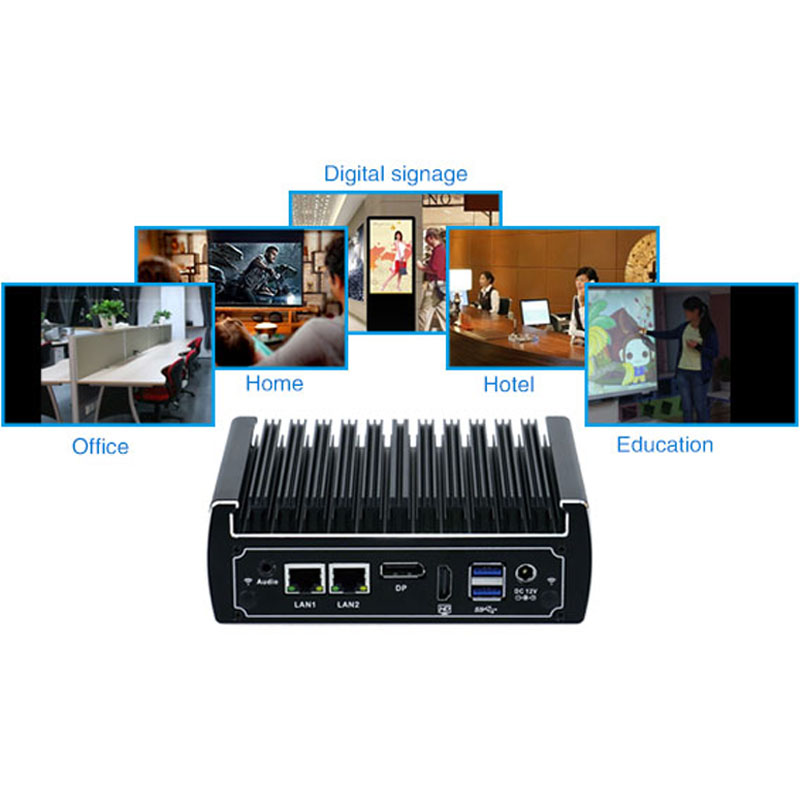
Die Onderhoudslas Waaroor Niemand Praat Nie
Industriële rekenaars bestuur produksielyn, monitor kritieke infrastruktuur en beheer prosesse wat nie net vir roetine-onderhoud gestop kan word nie. Maar elke stuk toerusting benodig uiteindelik aandag. Die vraag is nie of onderhoud nodig is nie—dit is hoeveel onderhoud vereis word en hoe ontwrigtend dit word.
Fanlose industriële rekenaars is gedeeltelik ontwerp om hierdie probleem aan te spreek. Deur die koelventilator te verwyder, word ’n algemene onderhoudstaak uit die weg geruim. Geen ventilatorfilters om skoon te maak of te vervang nie. Geen ventilatormotors om te monitor vir lagerversletting nie. Geen ventilatorfailing wat die hele stelsel afskakel nie. Die onderhoudslas verskuif van gereelde, voorspelbare take na minder gereelde, meer strategiese take. Om hierdie verskuiwing te verstaan, help bedryfsspanne om beter te beplan en verrassings wat uit nalatige toerusting voortspruit, te vermy.
Wat Verander Wanneer die Ventilator Weg is
Die mees voor die hand liggende verskil is stofbestuur. Tradisionele rekenaars met ventilators trek lug deur die behuising, wat stof saambring. Hierdie stof bou op warmte-afvoerders op, wat termiese doeltreffendheid verminder. Dit bedek stroombane, wat moontlik kortsluitings veroorsaak. Dit verstopping ventilatorfilters, wat lugvloei verminder totdat die stelsel oorverhit.
Ventilatorlose industriële rekenaars trek nie lug deur die behuising nie. In plaas daarvan beweeg hitte vanaf die prosessor na die behuising deur termiese paaie—hittepype, termiese matte en direkte kontak tussen komponente en die behuising. Die behuising self tree as ’n warmte-afvoerder op, wat hitte na die omringende lug versprei. Stof sak steeds op buiterskoppels neer, maar dit bou nie binne op nie. Skoonmaak word ’n kwessie van die buitekant afvee eerder as om die behuising oop te maak en met interne besoedeling te werk.
Die werklike onderhoudskedule
Praktiese ervaring dui op ’n onderhoudritme wat aansienlik verskil van ventilator-gekoelde stelsels. Die buite-koelvlerke moet met perslug skoongemaak word elke ses maande, afhangende van die omgewing. ’n Skoon kantooromgewing mag jaarlikse skoonmaak toelaat. ’n Stofagtige werkswinkel kan kwartaallikse aandag vereis. Die sleutel is monitering—kontroleer oppervlaktemperature gereeld om stygende tendense te identifiseer wat verminderde hitteafvoer aandui.
Interne onderhoud is minimaal. Sonder ventilators wat lug deur die behuising beweeg, is daar min rede om die behuising oop te maak vir skoonmaak. Die RTC-batterye wat die stelselklok en BIOS-instellings handhaaf, het ’n tipiese leeftyd van ongeveer vyf jaar. Dit is feitlik die enigste interne komponent wat planmatige vervanging vereis. Alles anders—vaste-toestand-berging, geheuesteunmodules, prosessors—moet die leeftyd van die stelsel voltooi onder normale bedryfsomstandighede.
| Onderhoudstaak | Ventilator-gekoelde rekenaar | Koelselvrye industriële pc |
|---|---|---|
| Ventilatorfilter-skoonmaak | Elke 1–3 maande | Nie van toepassing nie |
| Ventilatorvervanging | Elke 1–2 jaar | Nie van toepassing nie |
| Verwydering van Stof van Hitteafvoer | Elke 3–6 maande (binne) | Elke 6 maande (buitevinne) |
| Batteryvervanging | Elke 3–5 jaar | Elke 5 jaar |
| Stelselinspeksie | Kwartaalliks | Halfjaarliks |
Omgewingsfaktore wat die vergelyking verander
Die onderhoudskedule is nie vasgestel nie—dit hang sterk af van waar die stelsel bedryf word. ’n Vanslose industriële rekenaar in ’n klimaatbeheerde beheerkamer word aan relatief mild toestande blootgestel. Stof is minimaal. Temperatuur is stabiel. Vlugtigheid word beheer. Onderhoud kan tot by die langste einde van die aanbevole intervalle uitgestrek word.
Dieselfde stelsel op ’n fabrieksvloer naby slyp- of snybewerkings staar ’n ander werklikheid in die gesig. Metaalstof is geleidend. Dit kan kontakte verbind en kortsluitings veroorsaak as dit binne-in kom. Alhoewel vansomlose ontwerpe stof beter buite hou as ventilatorgekoelde alternatiewe, versamel die buiteoppervlaktes steeds rommel. Gereelde buite-reiniging voorkom dat hierdie rommel tydens onderhoudsaktiwiteite of deur onvolmaakte seals binne-in kom. Die omgewing bepaal die skedule meer as die hardeware.
Gewone foute wat lewensduur verkort
Verskeie onderhoudsfoute verminder die bruikbare lewe van fanlose industriële rekenaars. Die verkeerde gebruik van saamgeperste lug is een van die mees algemene. Hoëdruklug kan stof in plekke dwing waar dit andersins nie sou kom nie. 'n Betere benadering gebruik laedruklug of 'n sagte borstel, met die mondstuk teen 'n hoek gehou eerder as om direk op die behuising te blaas.
'n Ander fout behels skoonmaakmiddels. Harde oplosmiddels kan bedekkings beskadig, seals afbreek en residus agterlaat wat meer stof aantrek. Isoproplalkohol met 'n konsentrasie van 70–90% werk goed vir buite-reiniging wanneer dit met 'n vlasvrye lap toegepas word. Dit verdamp vinnig en laat minimale residu agter. Enigiets sterker loop die risiko om meer skade as voordeel te veroorsaak.
'n Derde fout is om die installasiomilieu te ignoreer. Ventilatorlose stelsels vertrou op passiewe lugvloei vir verkoeling. As ventilasiepaaie geblokkeer word—byvoorbeeld deur die stelsel te naby aan 'n muur te monteer of toestelle bo-op mekaar te stapel—verminder hitteafvoer en verkort die leeftyd van komponente. Korrekte installasie vereis dat daar voldoende ruimte rondom die behuising gelaat word vir lugstroming.
'n Geval uit die Veld: Voedselverwerkingfasiliteit
'n Voedselverwerkingsaanleg in die Midwest het dosyne industriële rekenaars deur sy verpakkinglyne bedryf. Die oorspronklike toestelle het ventilators en filters gebruik, en onderhoud het beduidende hulpbronne benodig. Tegnici het ure elke maand spandeer om filters skoon te maak, mislukte ventilators te vervang en oorverhittingprobleme op te los. Die omgewing—vochtig, met geleentelike spoelwerk en lugdraende meelstof—was veral streng vir ventilator-gekoelde stelsels.
Die aanleg het oor ‘n tweejarige tydperk oorgeskakel na ventilatorlose industriële rekenaars. Die onderhoudsbeeld het drasties verander. Filterskoonmaak het heeltemal van die skedule verdwyn. Ventilatorvervanging het heeltemal gestop. Die oorblywende onderhoud het bestaan uit kwartaallikse buitekant-skoonmaak en ‘n jaarlikse termiese toets—wat behuisingtemperature meet om te verseker dat die passiewe verkoelingstelsel steeds doeltreffend werk. Die onderhoudspan het die tyd wat gespaar is, heringedeel na ander preventiewe take, wat die algehele betroubaarheid van die toerusting verbeter het sonder dat addisionele personeel aangestel is.
Wanneer om hulp te roep
Nie elke probleem is ‘n onderhoudsprobleem nie. Sommige simptome dui op dieper probleme wat skoonmaak nie sal regmaak nie. Onverwags hoë behuisingtemperature ten spyte van skoon hitteafvoervinne kan dui op verswakte termiese koppelingsmateriaal tussen die prosessor en die behuising. Onderbrekende herbeginne kan eerder op kragtoevoerprobleme as op termiese probleme dui. Volgehoudende foute in die stelsellogboek kan dui op swakker wordende geheue of stoornruimte.
Om die verskil tussen rutynonderhoud en werklike mislukking te ken, bespaar tyd en voorkom onnodige vervanging. 'n Goede praktyk is om basis temperatuure en prestasie-metriek tydens aanvanklike installasie te dokumenteer. Om huidige lesings met daardie basislyn te vergelyk, verskaf vroeë waarskuwing van ontwikkelende probleme. Wanneer lesings beduidend afwyk, is dit tyd vir 'n dieper ondersoek eerder as nog 'n ronde skoonmaak.