 EN
EN

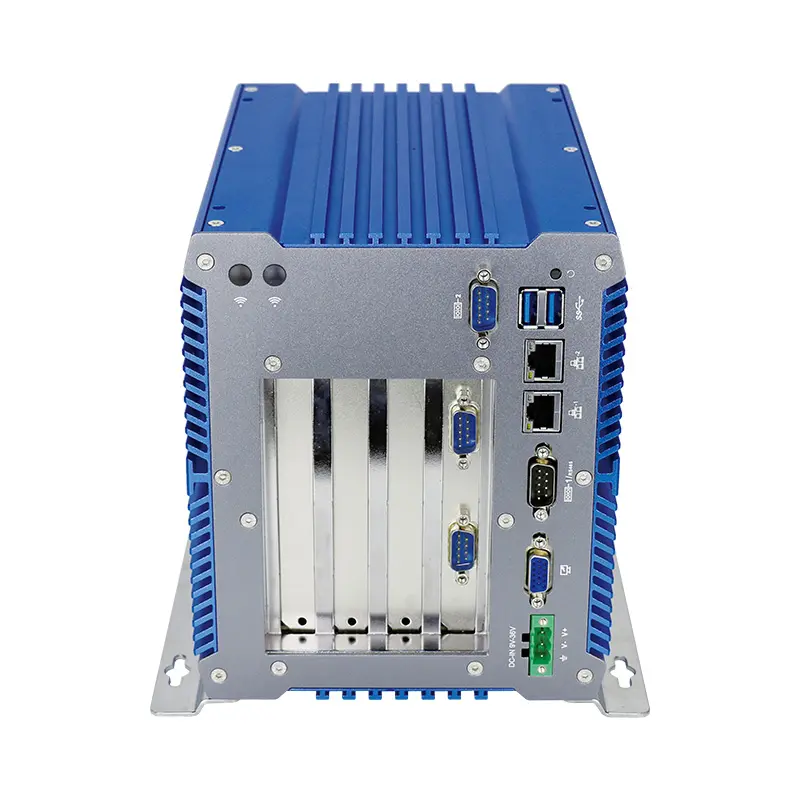
Essential Hardware Considerations for 24/7 Industrial PC Optimization
Choosing Processors and RAM for Continuous Workloads
Getting the most out of industrial PCs starts with picking the right processors and RAM to manage those constant workloads without breaking a sweat. Industrial PC processors need serious muscle power to juggle multiple tasks at once and process real time data from all sorts of factory floor applications. Look closely at core count and clock speeds since these factors really determine how well the system will perform under pressure. And don't forget about RAM either it plays a huge role in keeping things running smoothly. Most setups should start with around 8GB of RAM as a baseline, but leave room to expand later when software demands get heavier. Many manufacturers are finding that going green pays off too. Components designed for lower power consumption cut down on electricity bills over time, so companies save money while still getting great performance from their systems. This balance between cost control and computing power makes all the difference in day to day operations across manufacturing facilities everywhere.
SSD vs HDD: Storage Solutions for Reliability
Choosing between SSDs and HDDs makes a big difference in how well an industrial PC performs and stays reliable over time. SSDs really shine when it comes to speed, beating HDDs hands down for tasks that need quick access to data or fast processing power. Since they don't have any moving parts inside, SSDs keep delivering steady performance even under heavy workloads, which matters a lot in factories or other demanding places. The durability factor is another plus point for SSDs too. They just don't break down as often as traditional hard drives do. Some industry reports show SSD failure rates sitting below 1% annually, while HDDs tend to fail more frequently in tough industrial conditions. For companies running critical operations where every second counts, setting up RAID configurations with SSDs adds another layer of protection against data loss. These setups help maintain business continuity by keeping multiple copies of important information available at all times, something manufacturing plants and logistics centers simply cannot live without.
Expansion Slots for Future-Proofing
When it comes to industrial PCs, enough expansion slots matter a lot if we want them to last through future tech changes. The slots make upgrading and adding peripherals much easier when technology keeps changing so fast these days. Standards like PCIe mean systems can take on all sorts of different components, which boosts what they can actually do. Take PCIe slots specifically they let data move faster between the PC and things like graphics cards or extra network adapters, something really important in places where performance counts. Going for industrial computers with plenty of expansion options means businesses won't have to replace whole systems every time something new comes along. Just plug in what works best now while still being ready for whatever comes next without breaking the bank on total replacements.
Environmental Resilience in Industrial PC Optimization
IP Ratings for Dust and Moisture Protection
Getting familiar with IP ratings matters a lot when protecting industrial computers from stuff like dirt and dampness getting inside them. The IP stands for Ingress Protection, basically telling us how well something can keep out solid particles and liquid. Take IP54 as one example it stops most dust from entering and handles splashes pretty well. Then there's IP68 which means total dust proofing plus being able to sit underwater without damage. We've seen plenty of cases where machines break down because dust or moisture got into sensitive components over time. Going with higher rated systems really cuts down on unexpected breakdowns and makes things last longer. Anyone working in factories or outdoor locations where dust floats around or water might splash should look at least for IP65 protection. That rating gives enough defense against everyday environmental challenges while still keeping costs reasonable compared to going all out with maximum protection levels.
Temperature Tolerance Ranges (-40°C to 85°C)
How well industrial PCs handle temperature extremes matters a lot for their lifespan and how they perform day to day. Take places like offshore drilling platforms or cold storage facilities where machines have to keep running despite scorching heat or freezing cold. Some field equipment needs computers that can operate reliably between minus 40 degrees Celsius all the way up to 85 degrees Celsius. When parts aren't built for these kinds of conditions, breakdowns happen more frequently, causing expensive production stoppages. Getting the right specs on temperature resistance isn't just about avoiding crashes though. It actually makes systems work better when pushed hard in tough environments, something manufacturers should consider when building out their infrastructure.
Vibration-Resistant Component Design
Too much vibration can really mess with how PC parts work and might actually bring whole systems crashing down. Manufacturing floors are especially bad for this since machines are always shaking things around there. When designing equipment for places like these, vibration resistance matters a lot because even tiny movements of internal components can throw everything off track. That's why industrial strength parts exist specifically for harsh conditions. These toughened components meet rigorous specs for resisting shakes and rattles. They're built to take punishment without breaking down, which means longer lasting performance and fewer surprises when things go quiet on the factory floor during production runs.
Thermal Management Strategies
Active vs Passive Cooling Systems
When deciding between active and passive cooling for industrial PCs, thermal management becomes a key consideration. Active systems typically include fans or liquid coolants that actively push heat away from components. These work best when dealing with serious heat output in high performance situations. On the flip side, passive cooling depends mainly on heat sinks and whatever air moves naturally around them. This makes sense in places where noise matters or when saving electricity counts for the bottom line. The upside of active cooling? It tends to keep machines running cooler longer, which means they last longer overall. But there's a catch too many extra parts mean higher power draw and potential breakdowns down the road. Passive options might not handle extreme temps as well, but they have fewer things that can break since most components stay still. Most engineers I know spend time looking at what kind of space the equipment will live in and exactly what kind of performance demands exist before picking a cooling strategy.
Optimal Fan Placement Configurations
Where we put fans inside industrial PCs really matters for how air moves around and keeps things cool. Getting this right is super important for managing heat properly. When fans are arranged strategically, they help move air where it needs to go, blowing over parts that generate heat and cutting down on those annoying hot spots. Take the push-pull setup for example, putting fans at both ends of the case creates a much stronger airflow throughout the whole system. Most cooling guides suggest matching fan directions with how air naturally flows and arranging them so they pass directly over heated components. Real world testing has shown bad fan placement leads to hotter running equipment and shorter life spans for components. This makes sense when we think about it the wrong way round - nobody wants their expensive hardware cooking itself because someone forgot where to stick a fan.
Thermal Interface Material Selection
When dealing with thermal management issues, picking the right thermal interface material (TIM) makes all the difference in getting rid of excess heat from those industrial PC parts. There are several different TIM options available on the market today. We've got thermal pastes which spread out pretty well between surfaces, thermal pads that come pre-cut for specific applications, and adhesive tapes that stick things together while still allowing heat transfer. The key thing here is matching the TIM to what needs cooling so heat actually moves from the component into the heat sink instead of building up inside. Most tech folks in the field will tell you that when working with high performance systems generating lots of heat, going for something with good conductivity like silver based thermal paste tends to work best. Following proper guidelines when applying these materials isn't just nice to do it's essential if we want our industrial PCs running smoothly without unexpected failures down the road.
Predictive Maintenance Schedules
Predictive maintenance represents a smarter way to keep machines running smoothly by catching problems before they cause breakdowns, which matters a lot in factories operating around the clock. Traditional maintenance schedules just don't cut it anymore compared to this data-driven approach that actually tells operators when something like an industrial computer is likely to go south. The whole system relies heavily on various monitoring devices and analysis programs that track how equipment performs day after day. These tools spot warning signs early on so technicians can fix issues before they turn into major headaches. Take one factory floor where workers started using these predictive techniques last year. They saved roughly 30 percent on repair bills and slashed those annoying surprise shutdowns that used to happen every few weeks. Makes sense really, because nobody wants their production line grinding to a halt at the worst possible moment.
Automated Dust Removal Systems
Keeping industrial systems clean from dust and dirt matters a lot when it comes to running operations smoothly and getting more life out of expensive machinery. That's where automated dust removal systems come into play as a game changer. These systems work around the clock sweeping away all those pesky particles without anyone needing to climb ladders or grab brooms. Factories that install these kinds of solutions tend to see their equipment last longer and perform better overall. Dust buildup causes all sorts of problems like overheating components and unexpected breakdowns, which means less downtime for repairs. Some real world numbers back this up too. Plants using automated cleaning report cutting down on dust related failures by about half in many cases. The result? Fewer emergency fixes and production lines that keep moving instead of grinding to a halt unexpectedly.
Component Lifecycle Tracking
Tracking component lifecycles helps predict when parts need replacing before they fail, which keeps industrial PC systems running smoothly. Good software tools make all the difference here, giving plant managers actual data on how worn down those hard drives, motherboards, and other critical parts really are. When maintenance teams see these reports, they can schedule replacements during planned downtimes instead of scrambling after a breakdown. Companies that started using this kind of tracking saw their repair bills drop by around 30% last year because they caught problems early. The whole point is simple preventive maintenance saves money and headaches. Systems just work better when we replace parts based on real conditions rather than waiting for something to break.
Security and Redundancy in 24/7 Systems
Firewall Configuration for OT Environments
Security in operational technology (OT) environments presents some pretty serious problems because these systems run essential industrial operations while also getting more connected to regular IT infrastructure all the time. When it comes to keeping these systems safe from hackers, having good firewall setup is absolutely necessary. Companies need to think beyond just basic protection though. A solid defense strategy should include things like stateful firewalls that track traffic patterns, intrusion detection systems that spot suspicious activity, and network segmentation to contain any breaches before they spread throughout the whole system. Badly configured firewalls are a major risk factor. Just look at what happened back in 2010 with Stuxnet damaging nuclear centrifuges in Iran. That attack showed exactly why weak cybersecurity in industrial settings can have catastrophic consequences for both businesses and national security.
RAID Array Implementation
RAID stands for Redundant Array of Independent Disks and plays a big role in keeping data safe and systems running smoothly during round-the-clock operations. When data gets spread out over several disks instead of sitting on just one, it protects against losing everything if a single disk crashes. There are different ways to set up RAID depending on what kind of work environment needs protection. Take RAID 1 for example, which basically duplicates information so there's always a backup copy available when needed. Then there's RAID 5 that strikes a good middle ground between speed improvements and protection from hardware failures. Looking at actual field reports, companies that skip implementing RAID configurations tend to face much higher risks of losing critical data and experiencing unexpected system shutdowns. This makes sense why most IT departments prioritize getting RAID properly configured before deploying mission-critical infrastructure.
Failover Power Supply Requirements
Industrial systems absolutely need backup power sources because these redundancies help cut down on downtime and keep operations running smoothly when things go wrong. When there's a failure in one power supply, the redundant system kicks in so production doesn't stop cold. Take UPS units for instance, those uninterruptible power supplies with smart energy management features really make a difference on factory floors. Some manufacturers report losing tens of thousands per hour during unexpected outages caused by power issues. That kind of money drain hits productivity hard and creates all sorts of headaches for plant managers. For companies serious about keeping their facilities up and running, spending on quality power redundancy isn't just good business it's practically essential insurance against costly interruptions.