 EN
EN

Environmental Durability and Protection Standards
Understanding IP Ratings for Dust and Water Resistance
IP ratings are basically how we measure how tough industrial panel computers are when it comes to keeping out dust and water. Each rating has two numbers. The first number tells us about protection from things like dirt and dust particles getting inside, and the second number shows how well the device stands up to water exposure. Let's look at some common ones. IP65 means the device is completely sealed against dust and can handle water sprayed from a jet nozzle. IP67 goes one step further with full dust protection plus temporary underwater immersion. Then there's IP68 which is pretty much the gold standard for ruggedness. These high-end ratings make sure the equipment lasts longer even in harsh environments where regular electronics would fail.
Looking at real world applications helps understand how these ratings matter in practice. IP65 rated devices hold up well on factory floors covered in dust and debris, and they survive the occasional hose down during cleaning routines. For tougher situations, IP67 and IP68 equipment becomes necessary. These higher rated products work great outdoors where rain and snow are common problems, or inside food processing plants where water is everywhere. Real field testing backs up what the specs claim. Take IP68 rated gear for instance it's commonly found in marine environments, construction sites near water sources, and even underground utility systems where moisture is always present. The difference between these protection levels isn't just theoretical stuff from lab reports.
Operating Temperature and Vibration Tolerance
Operating temperature range stands out as one of those key specs when looking at industrial panel computers, basically telling us how well they hold up in really harsh conditions. Most panels come rated somewhere around -20 degrees Celsius all the way up to 60 degrees, which actually covers pretty much everything from freezing warehouses where things need to stay super cold, right through to hot factory floors where it gets absolutely blistering. Getting this spec right matters a lot because if equipment isn't built for what it faces daily, systems tend to crash or just plain work worse than they should, and nobody wants that kind of downtime messing up production schedules.
Vibration tolerance matters just as much for panel PCs, particularly where there's lots of heavy machinery around such as in factories or transport environments. These devices get put through their paces during testing, usually following military specs or industry benchmarks, so they can stand up to all sorts of vibrations from different frequencies. Without proper protection against these constant shakes, industrial computers don't last nearly as long. Some field tests actually show that good vibration handling makes a big difference in how long these systems keep working properly and how stable their performance stays over time.
Studies underline that extreme temperatures and mechanical stress can drastically impact the performance and lifespan of industrial panel PCs. It is essential to select devices that meet these rigorous environmental demands to prevent damage, maintain efficiency, and ensure uninterrupted industrial productivity.
Processing Power and Hardware Specifications
Choosing the Right Processor and RAM Capacity
Choosing the right processor for industrial panel PCs involves looking at what the system actually needs to do in real world conditions. Processing speed matters a lot, as does how many cores are available and whether they work well with what the software requires. Take Intel's lineup for instance: going with an i3, i5 or even better an i7 makes all the difference when dealing with heavy duty tasks. But if the job isn't so demanding, maybe a basic Celeron processor would get the job done just fine without breaking the bank. Getting this part right means the panel computer won't struggle under pressure when workers need it most during production runs.
RAM plays a really important part when it comes to making multitasking work better and getting applications to run faster. When there's enough RAM installed, computers can handle multiple programs at once without slowing down so much, plus data moves around inside the system more efficiently. Most factories and manufacturing setups will get by fine with around 4 gigabytes of RAM these days, though some heavier operations might need upwards of 8 gigs or even more depending on what software they're running. Looking at how things actually work in practice, most IT folks recommend matching CPU power with appropriate memory amounts to avoid those frustrating slowdowns everyone hates. Getting this balance right helps keep machines running reliably day after day without constant crashes or freezes.
Let's look at why these parts matter so much. Industry reports show companies running their systems with enough power and good memory capacity see fewer processing delays and better performance on important tasks. When manufacturers get the right mix between processor speed and available RAM, their industrial panel PCs actually handle workload demands properly. This balance makes all the difference in day to day operations where timing matters and downtime costs money.
Storage Solutions: SSDs vs. HDDs for Industrial Use
Choosing between SSDs and HDDs for storage really boils down to what matters most for any given situation. Speed, how long they'll last, and power consumption all play into this decision. Solid state drives work much quicker than traditional hard disks because there are no spinning components inside them. That makes SSDs great picks for applications where fast data retrieval is critical, especially in factories or other places where machines need instant responses. Plus, these drives consume less electricity overall. Another big plus? They handle rough handling better too. Most people don't realize that regular hard drives can get damaged easily if dropped or exposed to constant shaking, which happens quite often in manufacturing environments.
In contrast, HDDs might be more suitable for applications where large volumes of data storage are needed on a budget. However, their vulnerability to vibration can make them less reliable in harsh industrial conditions, where durability is a priority.
Durability testing shows SSDs handle rough conditions much better than HDDs, especially when dealing with shocks or big temperature swings. For mission-critical systems where keeping data safe and getting fast access matters most, SSDs come out on top every time. Deciding between these storage options really comes down to looking at what kind of environment they'll face day to day. Industrial applications often need different approaches based on factors like vibration levels, operating temperatures, and how important quick response times actually are for the particular task at hand.
Display Technology and Operational Readability
Capacitive vs. Resistive Touchscreen Functionality
Picking out industrial panel PCs means knowing how touchscreens actually work. Capacitive screens detect when fingers touch them because our skin conducts electricity, which makes these screens feel faster and easier to use overall. Resistive screens work differently they need actual pressure applied to the surface, relying on two conductive layers beneath the glass to sense where someone touched. These technologies suit different situations in industry settings. Capacitive models tend to perform best where quick responses matter or when multiple fingers need to interact at once. On the flip side, resistive screens hold up better in tough environments especially if workers have to wear gloves while operating equipment. Looking at recent survey data from Industrial Touchscreen Magazine shows about three quarters of industrial users prefer capacitive tech due to their reliability and accurate response. Understanding these differences helps match touchscreen choices to what's really needed in any particular workplace situation.
High-Brightness Displays for Sunlight Visibility
Outdoor environments and bright industrial spaces require high brightness displays so workers can actually see what's on screen. Most of these displays hit around 1000 nits or higher just to fight off the sun glare. Manufacturers have added things like special anti-glare coatings and built-in light sensors to make sure screens stay readable even when conditions change from morning to afternoon. According to some industry data from 2024, there's been about a 30% jump in demand for these brighter screens across construction sites and transport hubs where nobody wants to squint at a display. For companies running industrial panel PCs day in and day out, investing in these brighter options pays off big time because they keep working properly no matter if it's sunny or cloudy outside.
Connectivity and Expansion Requirements
Essential Ports: USB, Ethernet, and Serial Interfaces
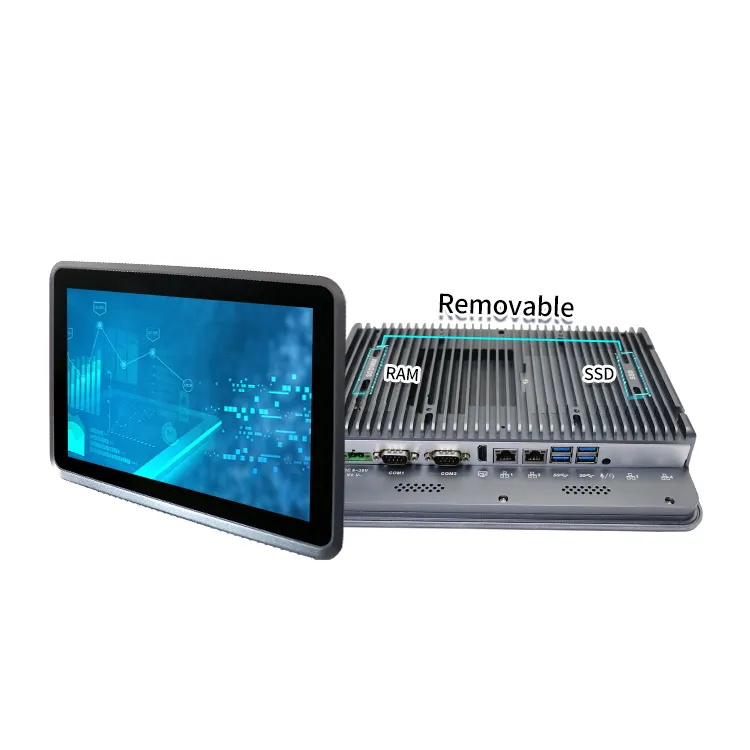
When it comes to industrial panel PCs, having the right connectivity options matters a lot for how well they work in manufacturing settings. Most machines come equipped with USB, Ethernet, and serial ports that let them talk to other equipment on the factory floor. The USB port is probably the most versatile part of the setup since workers can plug in all sorts of things like keyboards, external storage drives, or those handheld barcode scanners we see everywhere now. Ethernet gives these panels reliable internet access which makes sense when dealing with networked systems where data needs to move quickly between different parts of the plant. Then there's the serial interface that still has its place despite being old school technology. Many factories run on decades-old machinery that only speaks through serial connections, so without this port, some important equipment wouldn't be able to communicate at all. All these different connection types make industrial computers much more useful across various situations, helping keep production lines running smoothly day after day.
Having several different connectivity options matters a lot when it comes to expanding and integrating systems in industrial settings. With a range of available ports, connecting new hardware becomes straightforward, making system updates easier and allowing the whole setup to grow alongside changing tech requirements. The variety of connections does more than just let devices talk to each other across different platforms. It creates solid interfaces that work with established industrial standards and protocols. This makes operations run smoother day after day on factory floors everywhere.
Wireless Connectivity and Modular Expansion Options
Wireless connections like Wi-Fi and Bluetooth are now essential for making industrial panel PCs more flexible and functional. Getting rid of those pesky cables opens up new possibilities when designing systems and arranging equipment around a factory floor. With Wi-Fi, machines can talk to each other from across the room and pull data from the internet without needing to plug into Ethernet ports. This makes it much easier to move things around and install new setups quickly. Bluetooth works similarly but for shorter ranges, letting workers connect keyboards, mice, and other accessories wirelessly. Factories love this because it cuts down on cable clutter and keeps work areas looking neat and organized.
The ability to expand modularly really boosts what industrial computers can do, since companies can just plug in new features using add-on cards, docking stations, or special purpose modules. This kind of flexibility means systems can actually keep up with what operations need right now or what tech is coming down the pipeline. Manufacturers love this approach because they get to build customized solutions that fit exactly what each customer wants. Plus, when parts wear out or get outdated, there's no need to throw away the whole system for an upgrade. Looking at recent market research, we see a clear trend toward wireless connections working alongside these modular designs. Factories are increasingly going this route as they try to stay ahead of changing technology needs while still getting value from their existing equipment investments.
Mounting and Installation Flexibility
VESA, Panel, and Rack Mounting Solutions
Industrial panel PCs come with several mounting options such as VESA, panel mount, and rack mount configurations, each designed for specific industrial settings. VESA mounts are widely known for display support and work great when space is tight since they attach readily to existing structures. Panel mounting creates a clean look by integrating the PC directly into control panels or custom enclosures something plant managers love when they need everything to fit together neatly. Rack mounts are all over server rooms and data centers these days because they let technicians stack multiple units efficiently, saving precious floor space. According to recent market research, around 60 percent of companies go for modular options like VESA mounts simply because they adapt so well to changing requirements. With all these different ways to install them, industrial panel PCs meet a wide range of operational demands, making maintenance easier while squeezing every bit of usable space out of tough industrial environments.
Space Optimization for Industrial Environments
Getting the most out of available space matters a lot in factories and manufacturing plants, which is where panel PCs really shine when it comes to making better use of limited room without cutting corners on what they can do. These little powerhouse computers pack serious processing capability into tiny packages, so they work great in tight spots where bigger machines wouldn't fit but still need strong computing power. Their slim profiles and flat screens make installation straightforward, leaving plenty of room for other essential machinery around them. Take Taicenn as a case study their implementation in a modern car factory saved about 40% of floor space while maintaining full control over operations. Beyond just saving space, these compact systems actually improve how things run day to day, making layouts safer and easier to adjust as needed. When manufacturers think carefully about how they place these small panel computers throughout their facilities, they often find workflow improvements and better coordination between different parts of the production process.