 EN
EN

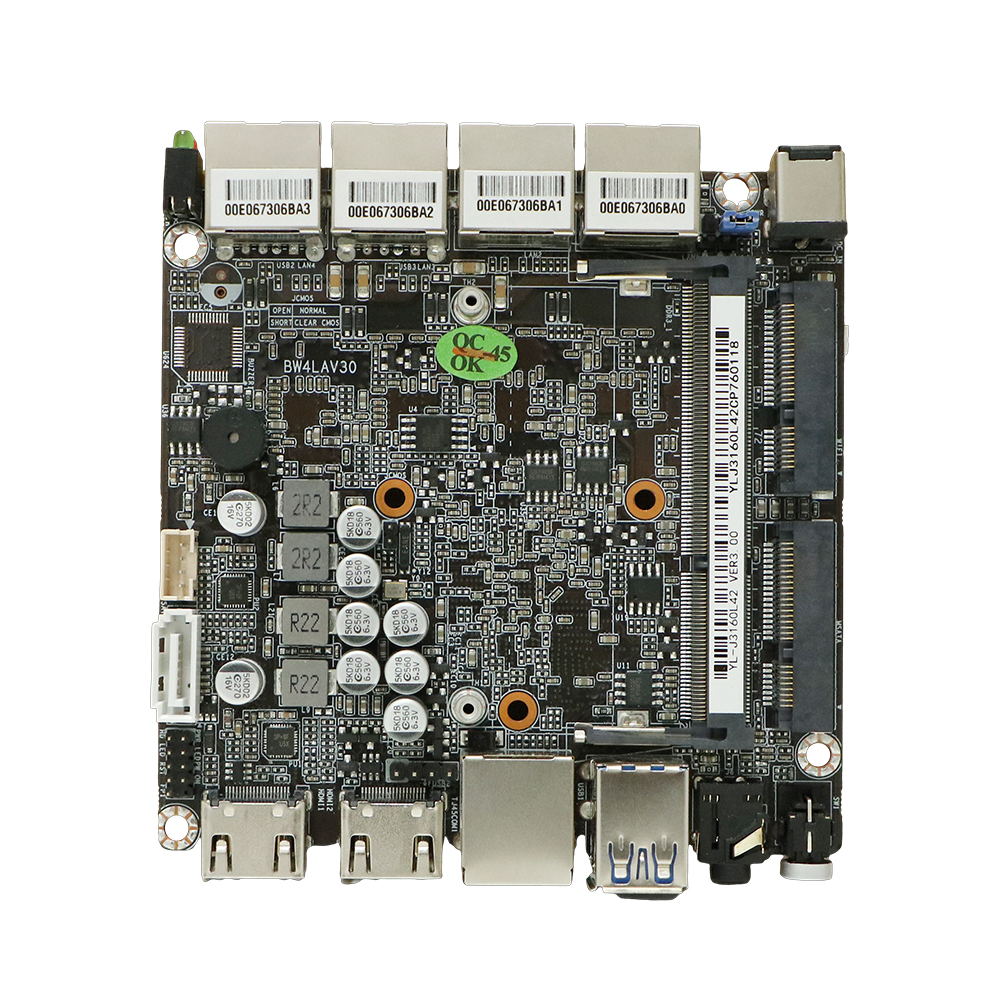
Thermal and Power Delivery Reliability for 24/7 Mini ITX Operation
Fanless Thermal Design: Heatsinks, Heat Spreaders, and Wide-Temperature Validation
When it comes to embedded systems that need to run non-stop day after day, going fanless makes sense because there are no moving parts to break down. Most industrial mini ITX boards these days come equipped with copper core heatsinks and those fancy vapor chamber tech things to handle power dissipation between 65 and 95 watts without any fans involved. They also throw in aluminum heat spreaders to cover those VRM areas and chipset spots where things get hot, plus special thermal pads connect important components together. All these cooling solutions have been put through their paces in real world conditions from freezing cold minus 40 degrees Celsius up to scorching plus 85 degrees Celsius, so they work reliably even when temperatures swing wildly. Independent tests show that well designed fanless setups keep CPU temps under control at around 85 degrees Celsius when running flat out, which matters a lot since overheating problems end up costing factories about seven hundred forty thousand dollars every year according to research from Ponemon Institute back in 2023.
| Thermal Resilience Factor | Consumer Grade | Industrial Embedded |
|---|---|---|
| Operating Temp Range | 0°C to 70°C | -40°C to +85°C |
| MTBF (Mean Time Between Failures) | 50,000 hrs | 100,000+ hrs |
| Vibration Resistance | Limited | MIL-STD-202G certified |
VRM Robustness in Mini ITX Motherboards: Phase Count, Capacitor Quality, and Continuous Load Stability
The quality of power delivery makes all the difference when systems need to run nonstop day after day. For industrial mini ITX boards, manufacturers typically incorporate 8+2 phase VRMs combined with DrMOS components. These help keep voltage stable even when workloads stay high for extended periods. Instead of regular electrolytic capacitors that can leak over time, these boards feature Japanese polymer alternatives rated to handle temperatures up to 105 degrees Celsius. This choice prevents failures caused by heat stress that would otherwise shorten component life. Before shipping, each motherboard spends three full days running at maximum capacity through rigorous burn-in tests. This process checks stability across different environments including edge computing setups, hospital equipment, and any system where an unexpected shutdown could cost businesses over 300 thousand dollars per hour according to recent industry reports from Business Continuity Institute. The result? Systems that maintain their performance levels regardless of sudden power surges or drops in demand.
Industrial I/O and Expansion Capabilities of Mini ITX Motherboards
Essential Embedded Interfaces: GPIO, RS-232/485, M.2 B-Key (Cellular/NVMe), and Isolated Digital I/O
When setting up industrial systems, regular consumer grade connections just won't cut it. The GPIO pins on these boards allow direct control over sensors and actuators in automated environments. Meanwhile, older RS-232 and RS-485 serial connections are still going strong across many manufacturing floors, especially when working with PLCs, CNC machines, and those big SCADA systems everyone talks about. M.2 B-Key slots have become pretty important too, since they can handle both 4G/5G modules for keeping tabs on remote IIoT devices and also serve as fast NVMe storage solutions for all that data logging work. Something worth noting is how isolated digital I/O channels help keep sensitive electronics safe from those pesky ground loops and voltage spikes that pop up everywhere on busy factory floors. According to recent industry research (Embedded Hardware Trends Survey, 2024), around three out of four industrial mini ITX motherboards actually include this protection feature. All these different connection options make sure machines can talk to each other reliably, something standard USB or Ethernet ports simply cannot achieve in most real world situations.
Mini ITX Expansion Realities: PCIe Lane Constraints, M.2 Slot Sharing, and I/O Shield Variants
A 170x170mm board size naturally restricts expansion options. Industrial mini ITX boards typically offer just 16 to 20 PCIe lanes total, which means the main PCIe x16 slot shares bandwidth with M.2 connectors. According to Embedded Computing Report from last year, about 63% of these boards use this shared configuration. For anyone planning to install graphics cards, AI acceleration hardware, or fast NVMe storage, checking how those PCIe lanes are distributed becomes really important right at the design stage. Don't forget about I/O shield choices either. Thin profile shields work well in tight spaces like kiosk systems or medical equipment housings, whereas taller shields make cabling easier in standard server racks. Getting the shield height wrong relative to available space inside the case causes around 34% of all installation problems. Always double check those measurements against what's actually available in the enclosure before locking down any mechanical details.
Long-Term Viability: Lifecycle Support and Sourcing for Mini ITX Motherboards
Extended Availability (5–10+ Years), BIOS Update Policies, and Industrial Supplier Commitments
When it comes to industrial applications, the need for stable hardware goes way beyond what we see in regular consumer products. Top manufacturers make sure their mini ITX motherboards stay available for anywhere between seven to fifteen years. This matters a lot because replacing equipment in industries such as healthcare or factory automation isn't just inconvenient—it can cost over half a million dollars when regulatory approvals need to be redone. Consumer level boards? Those tend to disappear from shelves after about eighteen months at most. Good BIOS update strategies really help stretch out the useful life of these systems too. They bring necessary security fixes, updated drivers, and better compatibility features all through the time the equipment stays in service. What do industrial suppliers usually offer then?
- Lifetime component sourcing with proactive obsolescence monitoring
- Public firmware update roadmaps aligned with long-term support windows
- Dedicated engineering support for customizations such as BIOS branding, boot optimization, or pinout modifications
These commitments safeguard long-term ROI by enabling infrastructure evolution without unplanned hardware refreshes.
Platform Selection: Chipset, CPU Compatibility, and Embedded Durability Trade-offs
Intel vs. AMD Embedded Platforms: Raptor Lake, Elkhart Lake, and Ryzen Embedded for Mini ITX Form Factor
When choosing between Intel and AMD for embedded systems, engineers need to weigh several factors including performance capabilities, how much heat the system can handle, and how long the hardware will last before needing replacement. Most industrial mini ITX boards are expected to run non-stop for anywhere from five to ten years, often working in extreme temperatures ranging from minus forty degrees Celsius all the way up to plus eighty-five. Intel's Elkhart Lake platform stands out for those super low power requirements where fans just aren't an option, typically under twelve watts TDP. On the other hand, their newer Raptor Lake chips bring PCIe 5.0 connectivity and pack up to twenty four cores, making them pretty much perfect for things like machine vision tasks, running analytics in real time, and handling edge computing with AI algorithms. The AMD Ryzen Embedded V3000 series makes use of the Zen 3 architecture which gives solid performance when multiple threads are needed at once. However, these processors do require more attention to cooling solutions since they consume between ten and fifty four watts depending on workload, so thermal management becomes a critical consideration during deployment planning.
| Comparison Factor | Intel Platforms | AMD Platforms |
|---|---|---|
| Power Efficiency | Elkhart Lake: 4.5–12W TDP | Ryzen V3000: 10–54W TDP |
| Peak Performance | Raptor Lake: Up to 24 cores | Ryzen V3000: Up to 8 cores |
| Thermal Tolerance | -40°C to 110°C (validated) | -40°C to 105°C (validated) |
| Longevity Commitment | 10-year production guarantees | 7-year availability windows |
Both vendors enforce rigorous validation—including thermal cycling, shock/vibration testing per MIL-STD-810H, and extended burn-in—to ensure resilience. When selecting a platform, prioritize socket longevity (LGA 1700 for Intel, AM5 for AMD), BIOS update cadence, and documented support timelines—not just raw specs.
FAQ
What is the main advantage of fanless thermal design for mini ITX motherboards?
Fanless thermal design minimizes the risks of mechanical failures due to the absence of moving parts, ensuring reliability even in extreme temperatures.
Why is VRM robustness important in continuous load conditions?
VRM robustness, with features like phase count and high-quality capacitors, ensures stable power delivery and prevents component failure under continuous high loads.