 EN
EN

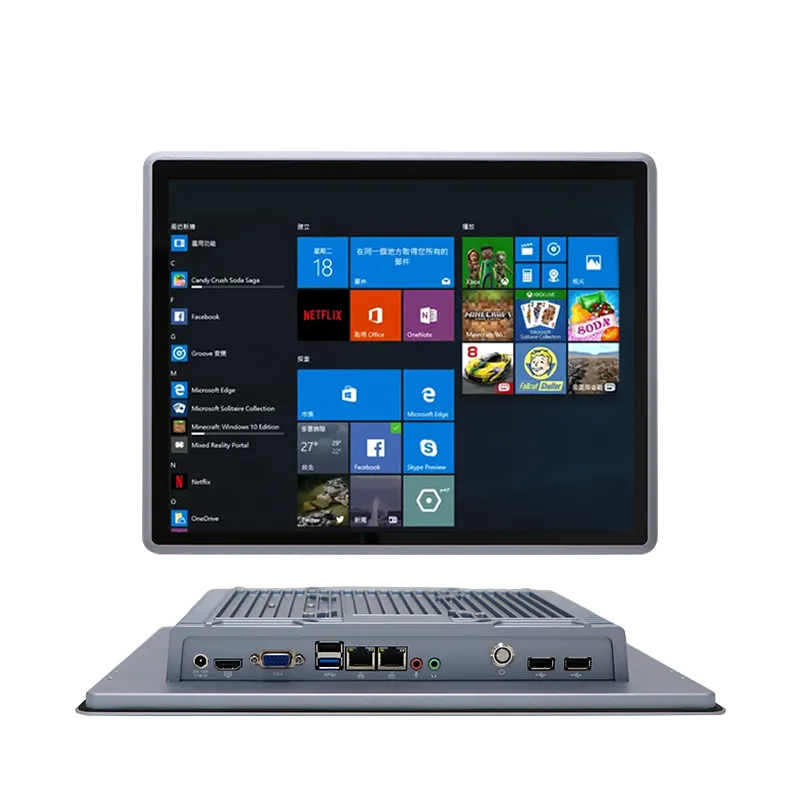
Industrial touch panel PCs stand as the cornerstone of seamless human-machine interaction (HMI) across manufacturing, logistics, automation, and industrial IoT (IIoT) sectors. Unlike consumer-grade touchscreen devices, these ruggedized computing solutions are engineered to withstand harsh industrial environments while delivering precise touch functionality and reliable performance—with size and tailored features being the two most critical factors that define their suitability for specific industrial applications. From compact 10-inch units for space-constrained workstations to larger 21.5-inch panels for centralized control rooms, industrial touch panel PCs come in a diverse range of sizes, each paired with industry-specific features that address the unique demands of factory floors, warehouse operations, and automated production lines. Below, we break down the most common sizes of industrial touch panel PCs and the core features that make these devices indispensable for modern industrial operations.
Common Sizes of Industrial Touch Panel PCs: Tailored for Industrial Spaces
Industrial touch panel PCs are designed with size versatility to fit the varied spatial and functional needs of industrial settings, with 10.1-inch and 21.5-inch being the most widely adopted form factors, alongside mid-range sizes that bridge the gap for flexible use cases.
- 10.1-inch Industrial Touch Panel PCs: The compact gold standard for decentralized, space-limited industrial environments, such as robotic workstations, small-scale automation hubs, and mobile industrial carts. Their small footprint allows for seamless integration into tight machinery enclosures or wall-mounted installations where larger displays are unfeasible, making them ideal for on-the-spot HMI control and real-time data checking.
- Mid-range Sizes (12–19 inches): A flexible choice for semi-centralized industrial operations, including warehouse inventory stations, packaging line control, and lab automation setups. These sizes strike a balance between display visibility and space efficiency, offering enough screen real estate for multi-window data monitoring without occupying excessive workspace.
- 21.5-inch Industrial Touch Panel PCs: The go-to for centralized control rooms, production line command centers, and large-scale manufacturing operations. Their large display area supports comprehensive data visualization, multi-parameter monitoring, and simultaneous control of multiple industrial systems, making them perfect for managers and engineers who need a holistic view of industrial processes.
All these sizes maintain a slim, industrial-grade chassis design, ensuring they integrate smoothly with existing industrial equipment and infrastructure, regardless of the deployment location.
Core Hardware Features of Industrial Touch Panel PCs
The performance and durability of industrial touch panel PCs stem from robust hardware features, engineered to meet the rigorous demands of 7/24 industrial operation and harsh environmental conditions.
- Ruggedized & Vibration-Resistant Build: A non-negotiable feature for factory floors and heavy machinery zones, industrial touch panel PCs feature reinforced enclosures that resist mechanical shock and continuous vibration—eliminating display or component damage that plagues consumer devices in industrial settings.
- Powerful, Energy-Efficient Processors: Equipped with Intel processors ranging from J-series (J1900, J6412) for reliable basic HMI tasks to Intel Core i3, i5, i7, and 14th Gen Core Ultra chips for high-performance data processing and multi-tasking. These processors deliver low power consumption alongside high computing power, supporting fanless design and 24/7 uninterrupted running.
- Fanless Cooling System: The fanless design removes moving parts, preventing dust and debris buildup— a common issue in dusty industrial environments—while also reducing hardware failure points and cutting down on maintenance needs. This design ensures stable operation even in high-dust, high-temperature workspaces.
- Versatile Connectivity: Industrial touch panel PCs come with a full suite of industrial-grade ports, including multiple LAN ports, COM ports, USB interfaces, and DC 12V power input. This extensive connectivity enables seamless integration with PLCs, sensors, industrial robots, and other automation equipment, ensuring smooth data transmission and device control.
Specialized Functional Features for Industrial Usability
Beyond core hardware, industrial touch panel PCs boast specialized functional features that enhance their usability and adaptability in industrial scenarios, setting them apart from commercial touchscreen devices.
- Industrial-Grade Touch Screens: Featuring scratch-resistant, water-resistant touch surfaces (often with multi-touch support), these screens enable precise operation even with gloved hands—a critical feature for factory workers who follow safety protocols. The touch response is calibrated for industrial accuracy, avoiding misinputs in fast-paced operation environments.
- Stable Power & Long-Term Reliability: With DC 12V low-voltage power supply, industrial touch panel PCs offer stable power input, reducing the risk of system shutdown from voltage fluctuations common in industrial power grids. Paired with high-quality internal components, they deliver years of reliable operation with minimal downtime.
- Customizable Integration: Many industrial touch panel PCs support modular component upgrades, such as removable RAM and SSD, allowing businesses to tailor the device’s performance to their evolving industrial needs without full hardware replacement—boosting cost-efficiency and long-term value.
Why Size and Feature Synergy Matters in Industrial Applications
The true value of industrial touch panel PCs lies in the perfect synergy between their size and features. A compact 10.1-inch panel with vibration resistance and fanless design is ideal for a robotic workstation on a factory floor, while a 21.5-inch panel with high-performance Intel Core processors and multi-port connectivity excels in a centralized control room. Choosing the right size with matching industrial features ensures that the touch panel PC not only fits the physical space but also delivers the performance, durability, and connectivity needed to streamline HMI processes, reduce operational inefficiencies, and support seamless industrial automation.
In summary, industrial touch panel PCs are not one-size-fits-all solutions—their diverse size range and purpose-built features make them adaptable to every corner of modern industrial operations. By aligning the right size and features with specific industrial use cases, businesses can unlock smoother human-machine interaction, more reliable real-time control, and enhanced efficiency across their production and operational workflows.