 EN
EN

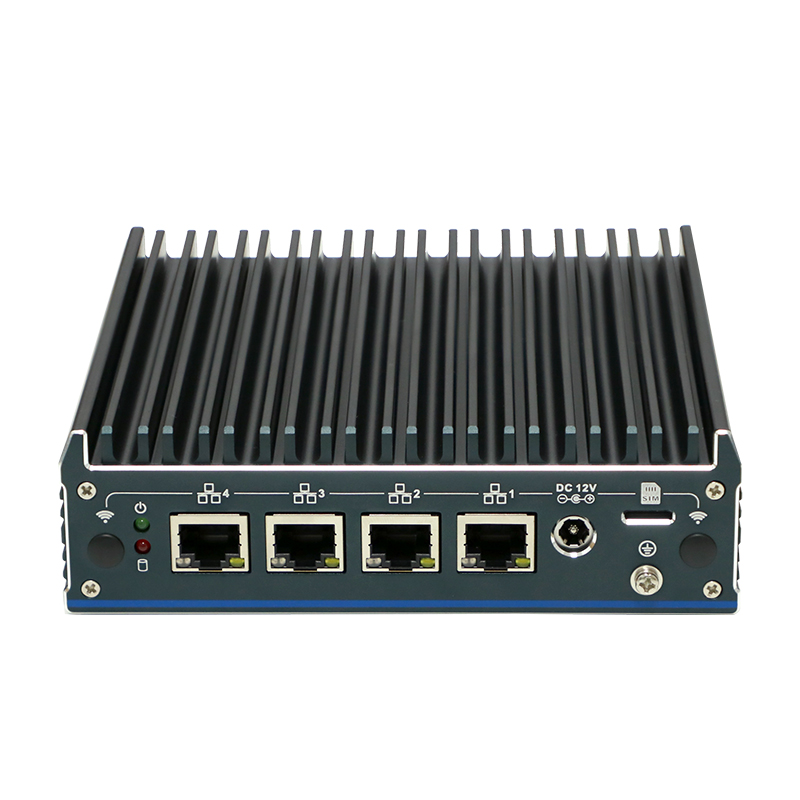
Miksi valita Linux-pienitietokone?
Linux-pienitietokoneet tarjoavat erinomaista arvoa yhdistämällä kompaktin muotokoon vahvaa avoimen lähdekoodin ohjelmistoa. Nämä laitteet säästävät huomattavasti työpöydän tilaa ja tarjoavat monipuolisia tietokonekäyttömahdollisuuksia – esimerkiksi mediasovellukset, verkkoliitetyt tallennusjärjestelmät (NAS) ja reuna-laskentajärjestelmät (edge computing). Niiden energiatehokkuus johtaa huomattavasti alhaisempaan sähkönkulutukseen verrattuna perinteisiin työasemiin, mikä vähentää sähkölaskuja ja ympäristövaikutuksia. Tämä tekee niistä ihanteellisia ratkaisuja tilanpuutteeseen liittyviin ympäristöihin, kuten kotitoimistoihin, luokkahuoneisiin ja upotettuihin järjestelmiin.
Kustannustehokkuus ulottuu alkuperäisen hankintasäästön yli. Alhaisemmat huoltovaatimukset, vähentyneet jäähdytystarpeet ja hiljainen passiivinen jäähdytys edistävät pitkän aikavälin käyttökustannusten säästöjä. Pienille yrityksille ja kotikäyttäjille tämä tarkoittaa suurempaa budjettijoustavuutta muiden tärkeiden investointien osalta. Niiden luotettavuus ja alhainen tehonkulutus tekevät niistä myös sopivia jatkuvatoimisille sovelluksille, kuten kotipalvelimille tai IoT-yhdyskäytävälle.
Kykyvien prosessorien ja muokattavan RAM-muistin – nykyaikaisissa malleissa jopa 64 Gt – ansiosta nämä laitteet käsittelevät vaativia työkuormia suorituskyvyn kärsimättä. Tämä monipuolisuus tekee Linux-pienikokoisista tietokoneista käytännöllisiä ratkaisuja, jotka yhdistävät henkilökohtaisen ja ammattimaisen tietokonekäytön tarpeet.
Parhaat Linux-pienikokoisten tietokoneiden käyttötavat: Kotikäyttölabra, NAS ja reuna-IoT
Luotettavan kotikäyttölabran rakentaminen Linux-pienikokoisilla tietokoneilla
Kompaktit Linux-pienikokoiset tietokoneet muuttavat kotikäyttöön tarkoitettuja laboratorioita (homelab) vallankumouksellisesti tarjoamalla yritystasoisia ominaisuuksia energiatehokkaissa laitteissa. Nämä laitteet suorittavat virtualisointialustoja, kuten Proxmox VE:tä, ja kevyitä Kubernetes-jakeluita (esim. MicroK8s), kun niiden tehonkulutus on alle 15 W – tämä tekee niistä ihanteellisia infrastruktuurin testaukseen, sovellusten omatoimiseen isännöintiin tai CI/CD-piipien suorittamiseen. Niiden hiljainen toiminta, tukea useille NVMe-asemille ja x86-/ARM-joustavuus mahdollistavat monimutkaisten kehitysympäristöjen käytön ilman rakkoon varattua tilaa tai meluisia tuulettimia. Harrastajat käyttävät niitä monisolmuisten verkkojen simulointiin tai säilöityjen palveluiden käyttöönottoon vain murto-osan pilvipalveluiden kustannuksista.
Turvallisen, matalan virrankulutuksen omaavan verkkolevyn (NAS) ja henkilökohtaisen pilvipalvelun käyttöönotto
Linux-pohjaiset pienikokoiset tietokoneet toimivat erinomaisen turvallisina ja energiatehokkaina NAS- ja henkilökohtaisten pilvipalveluiden ratkaisuina. Sisäänrakennettu salaus (LUKS), pakolliset käyttöoikeusohjausmekanismit (AppArmor/SELinux) sekä kypsyt tiedostojärjestelmät, kuten ZFS tai Btrfs, varmistavat tietojen eheytetyn säilymisen jatkuvassa 24/7-toiminnassa – tyypillisesti kuluttaen alle 15 W:n tehoa. Ratkaisut kuten TrueNAS Scale ja Nextcloud muuttavat nämä laitteet yksityisiksi pilvipalveluiksi, joissa on automatisoidut varmuuskopiot, etäkäyttömahdollisuudet ja tarkkaan määritellyt käyttöoikeusohjausmekanismit. Ilman liikkuvia osia ja tuettuaan SMB/NFS/AFP-protokollia ne tarjoavat yritystasoiset tiedostojakopalvelut Windows-, macOS- ja Linux-asiakasohjelmille ilman valmistajan riippuvuutta tai toistuvia tilausmaksuja.
Mahdollistaa reuna-verkkojen ja IoT-yhdyskäytävien sovellukset
Linux-pohjaiset mini-tietokoneet käsittelevät anturidataa paikallisesti IoT-yhdyskäytävänä, mikä poistaa pilvipohjaisen viivästykseen liittyvän ongelman teollisessa automaatiossa, älykkäissä rakennuksissa ja hyödyllisyyspalvelujen valvonnassa. Niiden kompakti suunnittelu mahdollistaa asennuksen kapeisiin tiloihin laitteiden läheisyyteen, kun taas GPIO-, USB-C-, PCIe- ja sarjaliitännät yhdistävät erilaisia antureita ja toimijoita. Reaaliaikainen analyysi suoritetaan laitteella käyttäen kehyksiä kuten Node-RED tai Telegraf ennen kuin vain olennaiset tiedot lähetetään eteenpäin – tämä vähentää kaistanleveyden käyttöä jopa 40 % tyypillisissä käyttötilanteissa. Kärsivällisemmin suunnitellut mallit (esimerkiksi IP65-luokituksen saaneet tai laajennetun lämpötila-alueen varmistukset saaneet) säilyttävät alle 5 ms:n vastausajat teollisuuslaitosten tuotantotiloissa tai ulkoisilla hyödyllisyyspalvelujen kohteissa.
Linux-mini-tietokoneiden laitteiston valintakäguidi
x86 vs. ARM: Yhteensopivuus, suorituskyky ja ekosysteemin tuki
X86- ja ARM-arhitehtuurien valinta määrittää Linux-pienitietokoneesi soveltuvuuden ja kestävyyden. x86-prosessorit (esim. Intel Core i3/i5, AMD Ryzen Embedded) tarjoavat laajimman ohjelmistoyhteensopivuuden, natiivin virtualisointituen (KVM) ja kypsän ajuriekosysteemin, mikä tekee niistä optimaaliset vaihtoehdot kotikäyttöön tarkoitettuihin laboratorioihin, NAS-järjestelmiin ja yleiskäyttöisiin palvelimiin. ARM-pohjaiset järjestelmät (esim. Rockchip RK3588, NXP i.MX93) erottautuvat tehonkulutuksensa (usein alle 10 W kuormituksen alla) ja lämmönhallinnan suhteen, mikä tekee niistä ideaalisia vaihtoehtoja päättömille reuna-asennuksille. Vaikka ARM-arkkitehtuuri on saanut vahvaa tukea Linux-jakeluista – kuten Ubuntu Server ja Debian – sen rajoitukset säilyvät edelleen esimerkiksi omien GPU-ajurien, joitakin Docker-kuvien yhteensopivuuden ja vanhojen x86-vain-binäärien osalta. Tulevaisuuden varalta joustavuutta tarjoavan ratkaisun kannalta x86-arkkitehtuuri pysyy edelleen oletussuositeltavana, ellei tehon tai lämmönhallinnan rajoitukset ole ehdottomia.
RAM-, tallennustilan ja liitäntöjen perusvaatimukset upotettuihin Linux-työkuormiin
Linux-työkuormien laitteiston optimointi vaatii strategista komponenttien yhdistämistä:
- RAM 8 Gt vähintään sujuvan monitehtävyyden varmistamiseksi; 16 Gt tai enemmän suositellaan Docker-orkestraatioon, kevyeen KVM-virtuaalisointiin tai ZFS-välimuistia varten. DDR5- ja LPDDR5x-vaihtoehdot parantavat tehokkuutta uudemmissa ARM-/x86-malleissa.
- Säilytys nVMe-SSD:t tarjoavat jopa 5-kertaisen nopeamman käynnistys- ja I/O-suorituskyvyn verrattuna SATA-SSD:iin ( 2023 Storage Performance Report ). Yhdistä ne HDD:ihin tai suurikapasiteettisiin QLC-SSD:eihin kustannustehokkaaseen NAS-tallennustilaan. Anna etusija malleille, joissa on kaksi M.2-liitintä (PCIe 4.0) ja ECC-muistituki, kun järjestelmän käytettävyys on kriittinen.
- Liitettävyys kaksinkertainen gigabit-Ethernet mahdollistaa linkkien yhdistämisen tai vianvarautumisen NAS- ja palomuurikäyttötapauksissa. USB4/thunderbolt 4 tukee 40 Gbps:n ulkoista tallennusta ja ketjutettuja näyttöjä. Wi-Fi 6E ja Bluetooth 5.3 varmistavat vakauden langattomassa hallinnassa headless-asennuksissa. Teollisessa IoT:ssä tarkista GPIO-liittimien, RS-232/485-sarjaporttien ja CAN-bussin tukeminen.
Anna aina etusija päivitettäville ratkaisuille – erityisesti käyttäjän itsensä vaihdettaville RAM- ja tallennusliittimille – laitteen elinkaaren pidentämiseksi ja Linux-työkuormien muutosten sopeuttamiseksi.
Linux-pienitietokoneen optimointi: jakelujen valinta ja asetusten parhaat käytännöt
Jakelujen sovittaminen työkuormiin: Ubuntu Server, Debian, LibreELEC ja Armbian
Oikean Linux-jakelun valinta maksimoi pienitietokoneesi potentiaalin samalla kun resursseja säästetään. Palvelinsovelluksiin, kuten kototyöasemille tai NAS-laitteisiin, Ubuntu Server tarjoaa pitkäaikaista tukea (LTS), automatisoituja turvallisuuspäivityksiä ja laajaa dokumentaatiota – kaikki tuettuna Canonicalin yritystason työkaluilla. Debian tarjoaa vertaamatonta vakautta jatkuvasti käytössä oleviin työkuormiin: yli 99 % paketeista testataan huolellisesti ennen kuin ne sisällytetään Stable-julkaisuihin. LibreELEC , joka on rakennettu erityisesti Kodi-sovellusta varten, tarjoaa minimaalisen ja nopeasti käynnistyvän mediasovelluksen käyttöjärjestelmän – ARM-laitteissa käynnistys kestää alle 15 sekuntia. Armbian tarjoaa laitteistoon optimoidut ytimet ja firmwaren ARM-pohjaisille mini-tietokoneille, parantaen lämmönhallintaa jopa 40 %:lla ja mahdollistaen täyden lisälaitteiden tuen, jota usein puuttuu yleisistä rakennuksista.
| Työmäärän tyyppi | Suositeltava jakelu | Avainetuly |
|---|---|---|
| Palvelin/pääeton | Ubuntu Server | Automaattiset turvallisuuspäivitykset |
| Yleiskäyttöinen | Debian | Nollakustannuksinen vakaus |
| Mediasuoratoisto | LibreELEC | Mahdollisimman pieni resurssikulutus |
| ARM-kehitys | Armbian | Laitteistokohtaiset optimoinnit |
Tarkista aina laitteiston yhteensopivuus ennen käyttöönottoa: vanhemmat tai erityisen alhaisen tehonkulutuksen mini-tietokoneet toimivat parhaiten kevytjakeluilla, kuten Debianilla LXQt-käyttöliittymällä tai Alpine Linuxilla – erityisesti nykyaikaisten verkkosovellusten tai säilötyjen palveluiden suorittamisessa. Vältä resurssiraskaita työpöytäympäristöjä, ellei niitä erityisesti tarvita.
UKK
Mitkä ovat Linux-pienitietokoneiden käytön tärkeimmät edut?
Linux-pienitietokoneet tarjoavat tiukkoja suunnitteluja avoimen lähdekoodin ohjelmistolla, energiatehokkuuden, alhaisen virrankulutuksen ja kustannustehokkaan huollon. Ne ovat ideaalisia tila-ajoissa rajoitetuissa ympäristöissä.
Mihin käyttötarkoituksiin Linux-pienitietokoneet soveltuvat parhaiten?
Linux-pienitietokoneet ovat erinomaisia kotikäyttöön tarkoitettuihin laboratorioihin (homelabs), verkkolevylaitteisiin (NAS), henkilökohtaisiin pilviratkaisuihin, reuna-alueen IoT-sovelluksiin ja teolliseen automaatioon niiden pienestä koosta ja vahvoista ominaisuuksista johtuen.
Miten valitsen x86- ja ARM-ar kitectuurien välillä Linux-pienitietokoneelle?
x86-arkkitehtuurit tarjoavat laajemman yhteensopivuuden ja tuen, mikä tekee niistä ideaalisia kotikäyttöön tarkoitettuihin laboratorioihin ja yleiskäyttöön. Toisaalta ARM-arkkitehtuurit ovat suositeltavia energiatehokkuuden ja reuna-alueen käyttötapauksien kannalta.
Miten minun tulisi optimoida Linux-pienitietokoneeni laitteiston tiettyihin työkuormiin?
Ota huomioon muistin määrä, tallennusvälineen tyyppi ja liitäntämahdollisuudet työkuorman vaatimusten perusteella. Varmista, että pienitietokoneessasi on päivitettäviä komponentteja, jotta voit sopeuttaa sen tuleviin tarpeisiisi.
Mitkä Linux-jakelut suositellaan mini-tietokoneisiin ja miksi?
Suositeltavia ovat Ubuntu Server, Debian, LibreELEC ja Armbian, joista jokainen on suunnattu eri työmääriin, kuten vakauden, resurssitehokkuuden ja laitespesifisen optimoinnin vaatimuksiin.
Sisällysluettelo
- Miksi valita Linux-pienitietokone?
- Parhaat Linux-pienikokoisten tietokoneiden käyttötavat: Kotikäyttölabra, NAS ja reuna-IoT
- Linux-mini-tietokoneiden laitteiston valintakäguidi
- Linux-pienitietokoneen optimointi: jakelujen valinta ja asetusten parhaat käytännöt
-
UKK
- Mitkä ovat Linux-pienitietokoneiden käytön tärkeimmät edut?
- Mihin käyttötarkoituksiin Linux-pienitietokoneet soveltuvat parhaiten?
- Miten valitsen x86- ja ARM-ar kitectuurien välillä Linux-pienitietokoneelle?
- Miten minun tulisi optimoida Linux-pienitietokoneeni laitteiston tiettyihin työkuormiin?
- Mitkä Linux-jakelut suositellaan mini-tietokoneisiin ja miksi?