 EN
EN

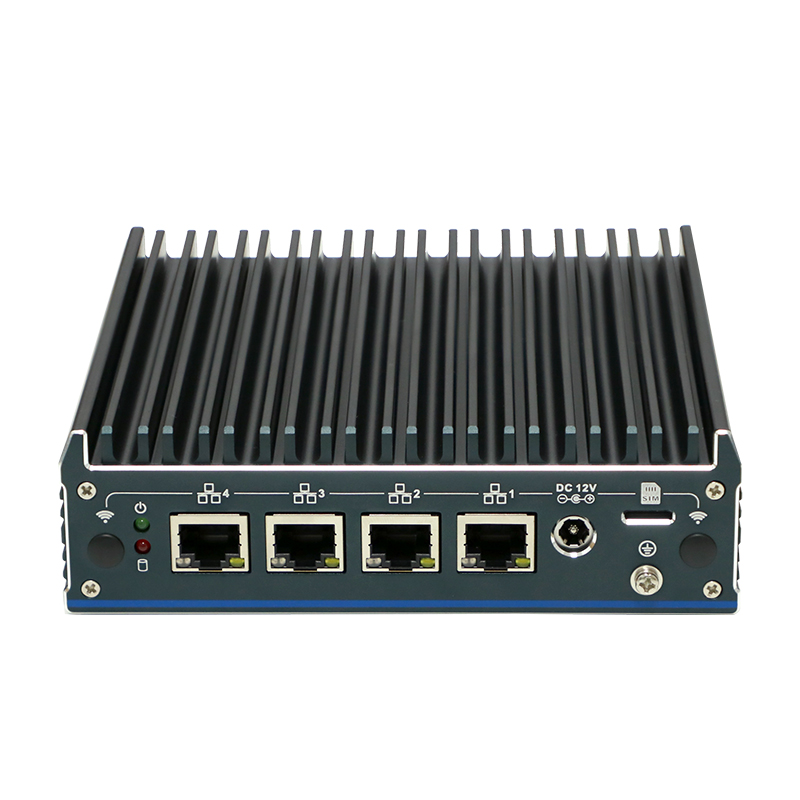
Dlaczego wybrać mini PC z systemem Linux? Kluczowe zalety i rzeczywista wartość
Mini PC z systemem Linux zapewniają wyjątkową wartość, łącząc kompaktowe obudowy z wydajnym oprogramowaniem open source. Urządzenia te zajmują znacznie mniej miejsca na biurku, jednocześnie oferując wszechstronne możliwości obliczeniowe — od centrów multimedialnych po magazyny danych dołączane do sieci (NAS) i obliczenia brzegowe (edge computing). Ich wysoka wydajność energetyczna przekłada się na znacznie niższe zużycie energii elektrycznej w porównaniu do tradycyjnych komputerów stacjonarnych, co redukuje koszty energii elektrycznej oraz wpływ na środowisko. Dlatego są one idealnym rozwiązaniem dla środowisk o ograniczonej przestrzeni, takich jak biura domowe, sale lekcyjne czy systemy wbudowane.
Opłacalność wykracza poza oszczędności związane z początkowym zakupem. Niższe wymagania serwisowe, ograniczone potrzeby chłodzenia oraz ciche, biernie działające chłodzenie przyczyniają się do długoterminowych oszczędności operacyjnych. Dla małych firm i użytkowników domowych oznacza to większą elastyczność budżetową przy inwestycjach w inne kluczowe obszary. Ich niezawodność oraz niskie pobory mocy czynią je również odpowiednimi do pracy ciągłej (24/7), np. w przypadku serwerów domowych lub bramek IoT.
Dzięki wydajnym procesorom oraz konfigurowalnej pamięci RAM – aż do 64 GB w nowoczesnych modelach – urządzenia te radzą sobie z wymagającymi obciążeniami bez utraty wydajności. Ta wszechstronność czyni minikomputery z systemem Linux praktycznym rozwiązaniem łączącym potrzeby obliczeniowe użytkowników prywatnych i zawodowych.
Najważniejsze zastosowania minikomputerów z systemem Linux: laboratorium domowe, NAS oraz urządzenia IoT na krawędzi sieci (Edge IoT)
Budowa niezawodnego laboratorium domowego przy użyciu minikomputerów z systemem Linux
Kompaktowe mini-PC z systemem Linux rewolucjonizują środowiska domowe (homelab), oferując możliwości na poziomie rozwiązań korporacyjnych w energooszczędnych obudowach. Urządzenia te obsługują platformy wirtualizacyjne, takie jak Proxmox VE, oraz lekkie dystrybucje Kubernetes (np. MicroK8s), zużywając przy tym mniej niż 15 W — idealnie nadają się do testowania infrastruktury, samodzielnego hostowania aplikacji lub uruchamiania potoków CI/CD. Ich cicha praca, obsługa wielu dysków NVMe oraz elastyczność architektury x86/ARM umożliwiają tworzenie złożonych środowisk programistycznych bez konieczności stosowania szaf rackowych czy hałaśliwych wentylatorów. Entuzjaści wykorzystują je do symulowania wielowęzłowych sieci lub wdrażania usług kontenerowych za ułamek kosztów chmury.
Wdrażanie bezpiecznego, niskoprądowego serwera NAS i osobowej chmury
Mini komputery oparte na systemie Linux działają jako wysoce bezpieczne i energooszczędne rozwiązania NAS oraz osobiste chmury. Wbudowana szyfrowanie (LUKS), obowiązkowe kontrole dostępu (AppArmor/SELinux) oraz dojrzałe systemy plików, takie jak ZFS lub Btrfs, zapewniają integralność danych podczas ciągłej pracy 24/7 – zwykle pobierając mniej niż 15 W. Rozwiązania takie jak TrueNAS Scale i Nextcloud przekształcają te urządzenia w prywatne chmury z automatycznymi kopiami zapasowymi, zdalnym dostępem oraz szczegółowymi kontrolami uprawnień. Dzięki brakowi części ruchomych oraz obsłudze protokołów SMB/NFS/AFP zapewniają profesjonalne udostępnianie plików dla klientów z systemami Windows, macOS i Linux — bez ryzyka uzależnienia od dostawcy ani powtarzających się opłat abonamentowych.
Włączanie aplikacji sieci brzegowej i bramki IoT
Mini komputery PC z systemem Linux przetwarzają dane z czujników lokalnie jako bramy IoT, eliminując opóźnienia chmury w zastosowaniach automatyzacji przemysłowej, inteligentnych budynków oraz monitoringu infrastruktury energetycznej. Ich zwarta konstrukcja umożliwia wdrożenie w ciasnych przestrzeniach blisko urządzeń, podczas gdy interfejsy GPIO, USB-C, PCIe oraz szeregowe pozwalają na połączenie różnorodnych czujników i siłowników. Analiza w czasie rzeczywistym odbywa się lokalnie na urządzeniu przy użyciu platform takich jak Node-RED lub Telegraf, zanim do sieci przesłane zostaną jedynie kluczowe wnioski — co w typowych wdrożeniach zmniejsza zużycie pasma o do 40%. Modele odporno na warunki środowiskowe (np. certyfikowane zgodnie z normą IP65 lub przeznaczone do pracy w rozszerzonym zakresie temperatur) zapewniają czasy odpowiedzi poniżej 5 ms na halach produkcyjnych lub zewnętrznych obiektach energetycznych.
Przewodnik wyboru sprzętu dla mini komputerów PC z systemem Linux
x86 vs. ARM: zgodność, wydajność i wsparcie ekosystemu
Wybór między architekturami x86 i ARM wpływa na zakres zastosowań oraz trwałość Twojego mini komputera z systemem Linux. Procesory x86 (np. Intel Core i3/i5, AMD Ryzen Embedded) zapewniają najszerszą kompatybilność oprogramowania, natywną obsługę wirtualizacji (KVM) oraz dojrzałe eko-systemy sterowników – co czyni je optymalnym wyborem dla domowych laboratoriów (homelab), serwerów NAS oraz serwerów ogólnego przeznaczenia. Systemy oparte na architekturze ARM (np. Rockchip RK3588, NXP i.MX93) wyróżniają się wysoką wydajnością energetyczną (często poniżej 10 W pod obciążeniem) oraz dużą rezerwą cieplną, co czyni je idealnym rozwiązaniem dla bezgłowowych wdrożeń brzegowych (edge). Choć obsługa dystrybucji Linuksa dla platform ARM znacznie się poprawiła – w tym Ubuntu Server i Debian – nadal utrzymują się pewne ograniczenia, takie jak brak lub ograniczona dostępność proprietarnych sterowników GPU, problemy z kompatybilnością niektórych obrazów Docker oraz brak obsługi starszych binarek wyłącznie dla x86. Dla zapewnienia elastyczności przyszłościowej x86 pozostaje zalecanym standardem, chyba że ograniczenia mocy czy temperatury są bezwzględnie priorytetowe.
Podstawowe wymagania dotyczące pamięci RAM, pamięci masowej oraz łączności dla obciążeń Linux w systemach wbudowanych
Optymalizacja sprzętu pod kątem obciążeń Linux wymaga strategicznego doboru komponentów:
- RAM 8 GB minimum do płynnego wielozadaniowości; 16 GB i więcej zalecane do orkiestracji Docker, lekkiej wirtualizacji KVM lub buforowania ZFS. Opcje DDR5 i LPDDR5x zwiększają wydajność energetyczną w nowszych modelach opartych na architekturze ARM/x86.
- Przechowywanie dyski SSD NVMe zapewniają do 5× szybszy czas uruchamiania i wyższą wydajność operacji wejścia/wyjścia niż dyski SSD SATA ( raport z 2023 r. dotyczący wydajności pamięci masowej ). Połącz je z dyskami HDD lub wysokiej pojemności dyskami SSD QLC w celu kosztowo efektywnego przechowywania danych w systemie NAS. W przypadku krytycznych dla działania aplikacji priorytet powinny mieć modele wyposażone w dwa gniazda M.2 (PCIe 4.0) oraz obsługę pamięci ECC.
- Łączność podwójne porty Gigabit Ethernet umożliwiają agregację łączy lub przełączanie na zapasowe połączenie w przypadku zastosowań NAS i zapór sieciowych. Interfejsy USB4/Thunderbolt 4 obsługują zewnętrzne urządzenia pamięci masowej z przepustowością do 40 Gb/s oraz łańcuchowe podłączanie wyświetlaczy. Technologie Wi-Fi 6E i Bluetooth 5.3 zapewniają stabilne bezprzewodowe zarządzanie urządzeniami działającymi bez interfejsu graficznego (headless). W przypadku przemysłowego IoT sprawdź dostępność nagłówków GPIO, portów szeregowych RS-232/485 oraz obsługi magistrali CAN.
Zawsze preferuj konstrukcje umożliwiające aktualizację – w szczególności łatwy dostęp użytkownika do slotów pamięci RAM i pamięci masowej – aby wydłużyć okres użytkowania urządzenia i dostosować je do zmieniających się obciążeń systemów Linux.
Optymalizacja Twojego mini PC z systemem Linux: najlepsze praktyki wyboru dystrybucji i konfiguracji
Dopasowanie dystrybucji do obciążeń roboczych: Ubuntu Server, Debian, LibreELEC oraz Armbian
Wybór odpowiedniej dystrybucji systemu Linux maksymalizuje potencjał Twojego mini PC i jednocześnie oszczędza zasoby. W przypadku aplikacji serwerowych, takich jak homelab lub NAS, Ubuntu Server zapewnia długoterminową obsługę (LTS), automatyczne aktualizacje zabezpieczeń oraz obszerne dokumentacje — wspierane narzędziami przedsiębiorstwa Canonical. Debian oferta nieporównywalną stabilność dla obciążeń działających non-stop, przy czym ponad 99% pakietów poddawanych jest rygorystycznemu testowaniu przed włączeniem do wersji Stable. LibreELEC , stworzony wyłącznie dla Kodi, zapewnia minimalny system operacyjny do obsługi multimediów o bardzo szybkim czasie uruchamiania — osiągając czas startu poniżej 15 sekund na urządzeniach ARM. Armbian dostarcza zoptymalizowanych pod kątem sprzętu jąder i oprogramowania układowego dla mini-PC opartych na architekturze ARM, poprawiając regulację temperatury nawet o 40% oraz zapewniając pełną obsługę urządzeń peryferyjnych, której często brakuje w ogólnodostępnych kompilacjach.
| Typ obciążenia | Zalecana dystrybucja | Główna przewaga |
|---|---|---|
| Serwer/bez interfejsu graficznego | Ubuntu Server | Automatyczne aktualizacje zabezpieczeń |
| Ogólnego przeznaczenia | Debian | Stabilność bez dodatkowych kosztów |
| Strumieniowanie multimediów | LibreELEC | Minimalny ślad zasobowy |
| Rozwój oprogramowania dla architektury ARM | Armbian | Optymalizacje specyficzne dla sprzętu |
Zawsze sprawdzaj zgodność sprzętu przed wdrożeniem: starsze lub ultra-niskoprzepustowe mini-PC najlepiej działają z lekkimi dystrybucjami, takimi jak Debian z środowiskiem LXQt lub Alpine Linux — szczególnie przy uruchamianiu nowoczesnych aplikacji internetowych lub usług kontenerowych. Unikaj zasobożądnych środowisk graficznych, chyba że są one wyraźnie wymagane.
Najczęściej zadawane pytania
Jakie są główne zalety używania mini PC z systemem Linux?
Mini PC z systemem Linux charakteryzują się kompaktowymi konstrukcjami, oprogramowaniem open source, wysoką wydajnością energetyczną oraz niskim zużyciem energii i kosztami konserwacji. Są one idealne dla środowisk o ograniczonej przestrzeni.
Dla jakich zastosowań mini PC z systemem Linux są najbardziej odpowiednie?
Mini PC z systemem Linux świetnie sprawdzają się w środowiskach domowych (homelab), w rozwiązaniach NAS, osobowych chmurach, wdrożeniach IoT na krawędzi sieci oraz w automatyce przemysłowej dzięki swojej małej wielkości i solidnym możliwościom.
Jak wybrać między architekturami x86 i ARM dla mini PC z systemem Linux?
architektury x86 oferują szerszą kompatybilność i wsparcie, co czyni je idealnym wyborem dla środowisk domowych (homelab) i zastosowań ogólnego przeznaczenia. Z kolei architektury ARM są preferowane ze względu na wydajność energetyczną oraz przydatność w wdrożeniach na krawędzi sieci.
Jak zoptymalizować sprzęt mini PC z systemem Linux pod konkretne obciążenia?
Należy wziąć pod uwagę pojemność pamięci RAM, typ pamięci masowej oraz opcje łączności w zależności od wymagań obciążenia. Upewnij się, że Twój mini PC posiada moduły możliwie do uaktualnienia, aby móc dostosować go do przyszłych potrzeb.
Jakie dystrybucje Linuksa są zalecane dla mini-PC i dlaczego?
Zalecane są Ubuntu Server, Debian, LibreELEC oraz Armbian – każda z nich jest dostosowana do innych wymagań obciążeniowych, takich jak stabilność, wydajność wykorzystania zasobów oraz optymalizacja specyficzna dla danego urządzenia.
Spis treści
- Dlaczego wybrać mini PC z systemem Linux? Kluczowe zalety i rzeczywista wartość
- Najważniejsze zastosowania minikomputerów z systemem Linux: laboratorium domowe, NAS oraz urządzenia IoT na krawędzi sieci (Edge IoT)
- Przewodnik wyboru sprzętu dla mini komputerów PC z systemem Linux
- Optymalizacja Twojego mini PC z systemem Linux: najlepsze praktyki wyboru dystrybucji i konfiguracji
-
Najczęściej zadawane pytania
- Jakie są główne zalety używania mini PC z systemem Linux?
- Dla jakich zastosowań mini PC z systemem Linux są najbardziej odpowiednie?
- Jak wybrać między architekturami x86 i ARM dla mini PC z systemem Linux?
- Jak zoptymalizować sprzęt mini PC z systemem Linux pod konkretne obciążenia?
- Jakie dystrybucje Linuksa są zalecane dla mini-PC i dlaczego?