 EN
EN

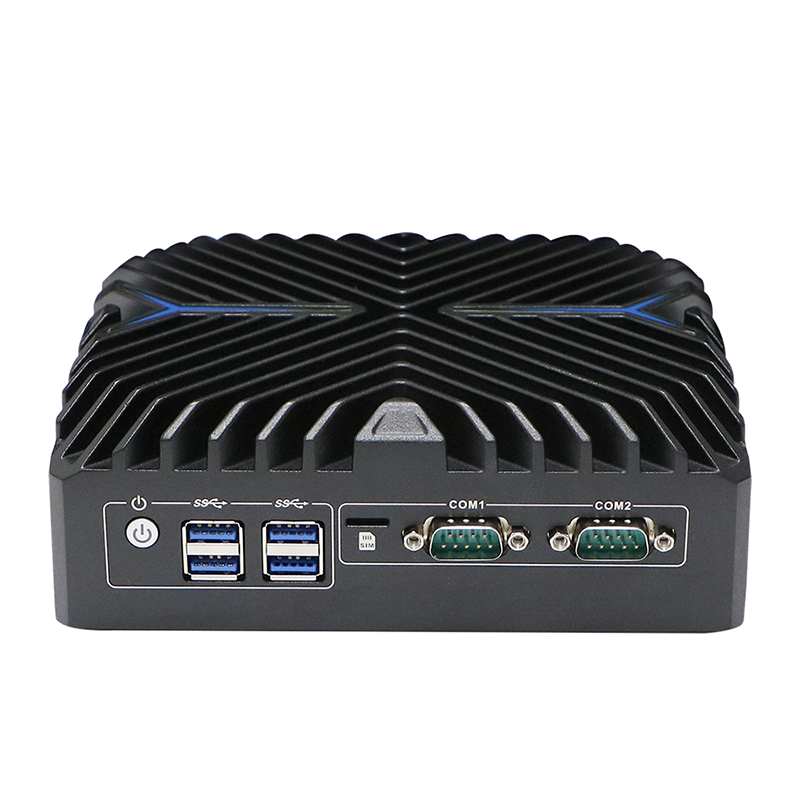
In the era of edge computing, cloud integration, and compact IT infrastructure design, Linux Mini PCs have emerged as a game-changing solution for server deployments across small and medium-sized businesses, edge data centers, and industrial IoT (IIoT) environments. Unlike traditional rack-mounted servers or bulky desktop-based server setups, Linux Mini PCs combine the lightweight, space-efficient hardware design of mini computing with the robust, open-source flexibility of the Linux operating system. This synergy delivers a suite of advantages that address the core pain points of modern server operations—from cost inefficiency to resource waste and complex maintenance. Below, we break down the key benefits that make Linux Mini PCs a standout choice for server applications, exploring their performance, cost, scalability, and reliability strengths.
Unmatched Cost Efficiency for Server Deployments
Cost is a primary consideration for any business building or scaling a server infrastructure, and Linux Mini PCs excel in both upfront and long-term cost savings. First, the hardware of Linux Mini PCs is inherently affordable: their compact form factor uses fewer physical components, reducing manufacturing and material costs compared to full-sized servers. Paired with the Linux OS—100% open-source and free from costly licensing fees, royalties, or subscription charges—businesses eliminate the recurring software expenses that plague proprietary OS-server combinations. Additionally, Linux Mini PCs are engineered for low power consumption, with fanless designs and energy-efficient processors (such as Intel N-series, Core Ultra, and J-series chips) drawing a fraction of the power of traditional servers. This translates to dramatic reductions in monthly electricity bills and cooling costs, a critical saving for 24/7 server operations. For small businesses, remote branch offices, or edge deployments with limited IT budgets, this cost-efficiency makes Linux Mini PCs a viable and sustainable server solution.
Exceptional Reliability and Stability for 24/7 Operation
Server uptime is non-negotiable, and Linux Mini PCs are built to deliver the consistent, uninterrupted performance that server environments demand. The Linux operating system is renowned for its rock-solid stability—its modular, secure architecture minimizes crashes, freezes, and system glitches, even under continuous load for weeks or months on end. This stability is amplified by the hardware design of industrial-grade Linux Mini PCs, which feature fanless cooling, ruggedized enclosures, and vibration resistance. Without moving parts like fans, these mini PCs eliminate the most common point of hardware failure in traditional servers, reducing the risk of downtime from mechanical breakdowns. They also operate seamlessly in harsh conditions, including high or low temperatures, dust, and industrial vibration—making them ideal for industrial server deployments in manufacturing, logistics, and IIoT where standard servers would falter. For mission-critical server tasks, the combination of Linux’s software stability and mini PC hardware durability ensures maximum uptime and minimal maintenance.
Space-Saving Design and Flexible Deployment
Traditional servers require dedicated rack space, climate-controlled server rooms, and extensive cabling—luxuries that many businesses, especially edge or remote operations, do not have. Linux Mini PCs solve this problem with their ultra-compact form factor, measuring just a few inches in size and fitting into tight spaces: under desks, on walls, in industrial enclosures, or even in distributed edge locations like retail stores, factory floors, or remote data collection points. Their small footprint also reduces the need for large IT infrastructure setups, making them perfect for businesses with limited office or warehouse space. Beyond space savings, Linux Mini PCs offer unmatched deployment flexibility. They support multiple connectivity options (Ethernet, USB, COM ports) and can be configured as headless servers (no monitor or keyboard required) for remote management— a key feature for distributed server networks. Whether deployed as a single standalone server for a small business or as part of a clustered edge server network, Linux Mini PCs adapt to diverse deployment needs with ease.
Open-Source Flexibility and Customization
Linux’s open-source nature is one of its greatest strengths, and when paired with mini PC hardware, it creates a fully customizable server solution tailored to specific business needs. Unlike proprietary operating systems that lock users into pre-set features and limited customization, Linux allows IT administrators to modify, tweak, and optimize the OS for their exact server workloads—whether it’s a file server, web server, DNS server, or IoT data server. Users can choose from hundreds of Linux distributions (distros) such as Ubuntu Server, Debian, CentOS, and Raspberry Pi OS, each optimized for different server applications, and install only the necessary software packages to reduce bloat and boost performance. This customization also extends to security: Linux’s open-source codebase allows for constant community-driven security updates and patches, and administrators can harden the OS to meet industry-specific security standards (e.g., for financial or healthcare data servers). For businesses with unique server requirements, this level of flexibility is impossible to achieve with closed, proprietary server systems.
Low Maintenance and Scalable Performance
Server maintenance can be a time-consuming and resource-intensive task, but Linux Mini PCs streamline this process significantly. The fanless hardware design means there are no moving parts to clean, replace, or service, cutting down on routine hardware maintenance. The Linux OS, meanwhile, is designed for low maintenance: it requires fewer updates than proprietary OSes, and updates can be scheduled remotely to avoid disrupting server operations. For IT teams with limited resources, this translates to less time spent on upkeep and more time on strategic IT initiatives. Additionally, Linux Mini PCs offer scalable performance for growing server needs. While entry-level models handle basic server tasks (e.g., file sharing, small business web hosting), high-performance Linux Mini PCs with Intel Core i3/i5/i7 or 12th/14th Gen Core Ultra processors can support more demanding workloads, such as edge data processing, virtualization, and multi-user server access. Businesses can start with a single Linux Mini PC server and scale horizontally by adding more units as their needs grow, without the need to replace entire server setups.
In conclusion, Linux Mini PCs redefine what a server can be—combining cost efficiency, reliability, flexibility, and customization in a compact, power-efficient package. For businesses looking to build a server infrastructure that aligns with the demands of modern computing—edge deployment, remote operations, and scalable growth—they offer a superior alternative to traditional server setups. Whether for small business IT, industrial IoT, or edge data centers, the advantages of Linux Mini PCs for servers extend far beyond their size: they deliver a practical, sustainable, and high-performance solution that adapts to the unique needs of any organization.